
Feature Overview
Harmony now supports automated test design based on user-defined requirements, streamlining the test design process and enhancing accuracy. It generates reliable and close to optimal test cases for domain testing
How It Works
- Step 1: Add Requirements Begin by entering your test requirements in the Test Design panel. These can be written in plain language. The language used to write the requirements will also be the language of the model and related reasoning.
- Step 2: Select Generate:
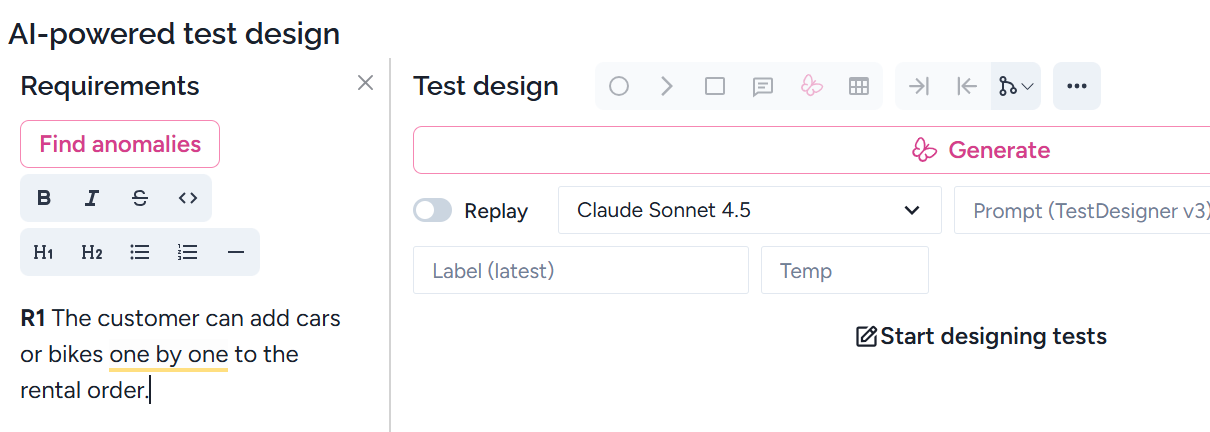
Harmony validates your input. If there's a problem, it generates a descriptive narrative that explains the issue and suggests corrections.
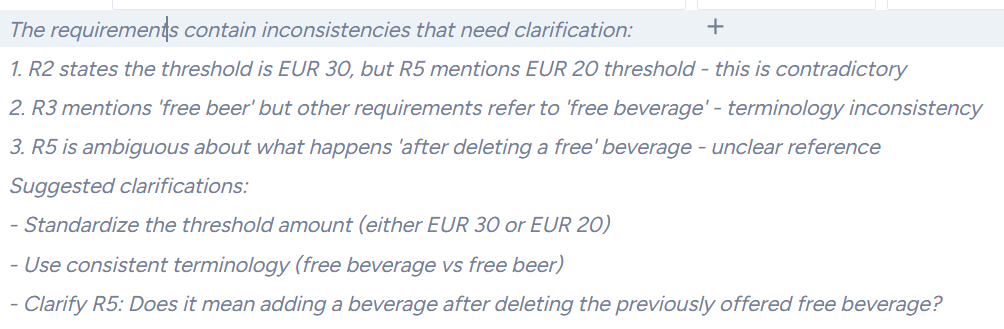
- Step 3: Review the generated model
If the requirements pass validation, Harmony automatically produces the model containing the relevant test cases for review. You are the human (expert) in the loop, and you need to validate the result. Harmony results in not only the action-state model but also the explanation, why the selected test design techniques are used:
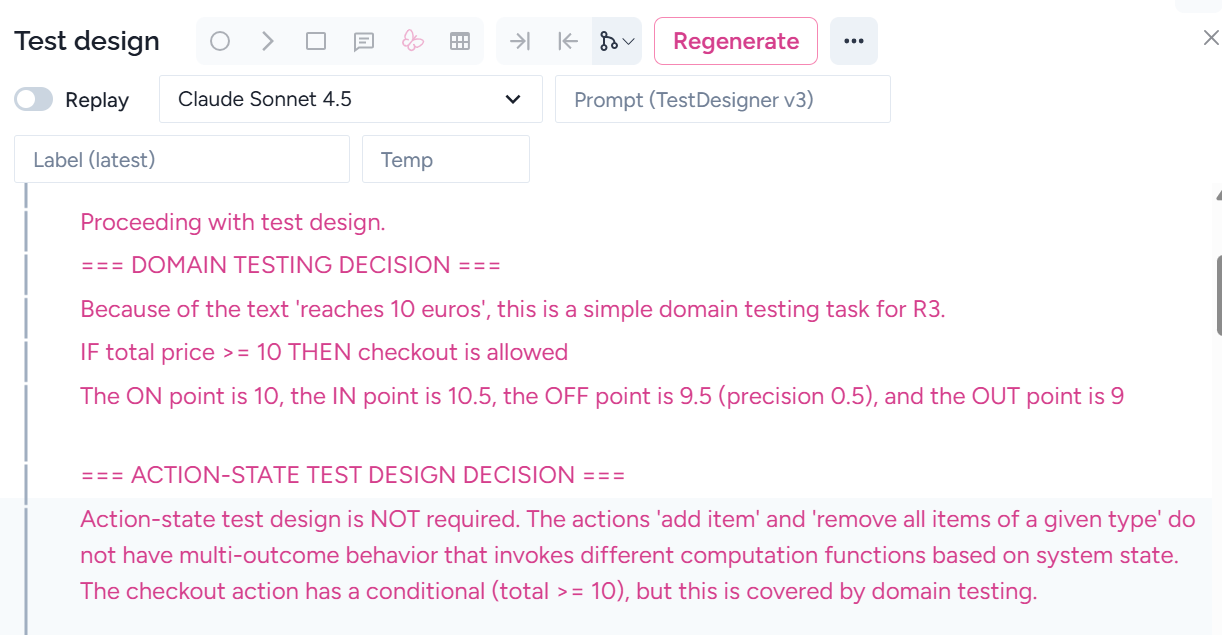
If the generated model is not perfect, you can modify the model or add some instructions to the AI. We suggest doing the second option. Any instruction can be added after the requirement, such as ‘Please don’t use domain testing’. After adding the instruction, select ‘Regenerate’, see Step 5.
- Step 4: Add general information for the whole project
There may be general information for the whole project or more features. These can be added to special places. Select New documentation, then give it a name.
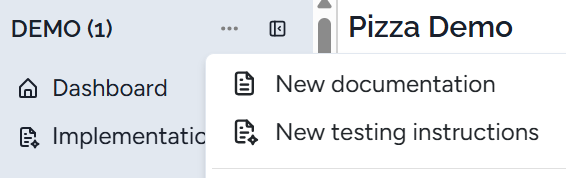
You can open it similarly to a feature and add some general instructions.
Example. In Harmony, we added:
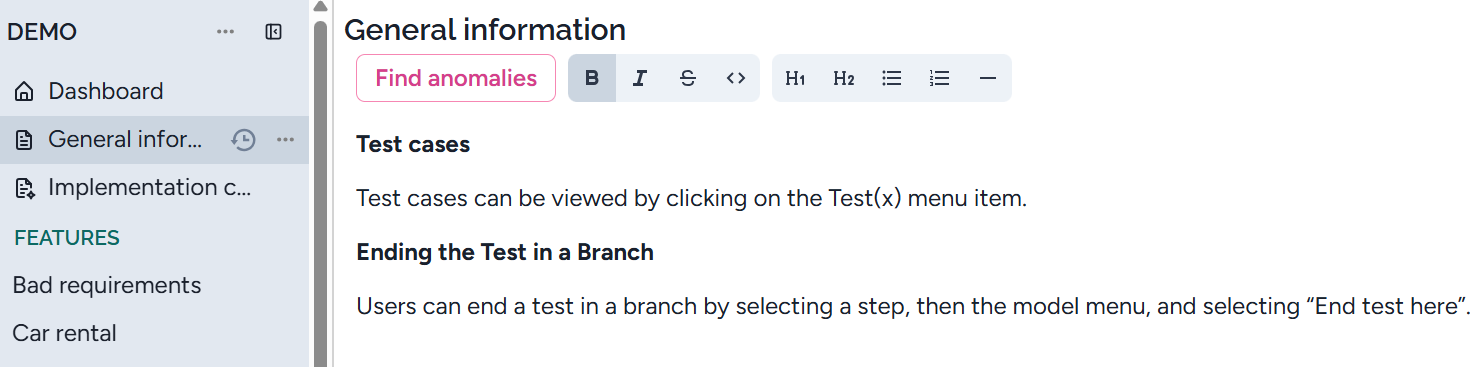
You can add more context files if needed.
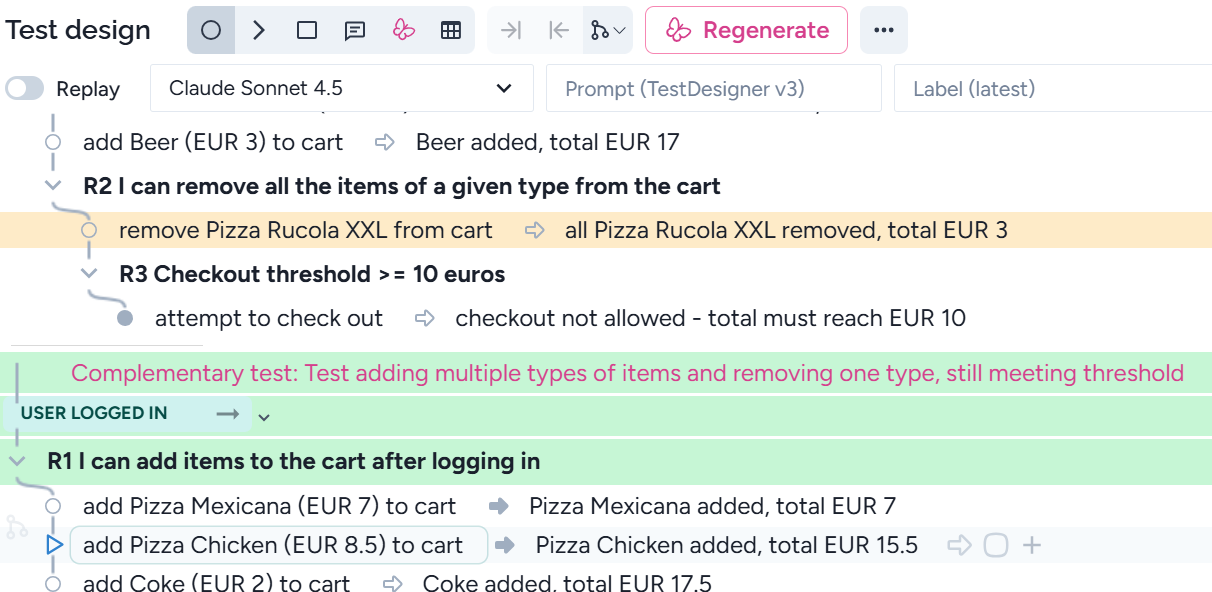
- Step 5: Regenerate if needed If you adjust any requirements after test generation, you can use Regenerate to produce updated test cases. Note that if test cases appear incorrect, a simple regeneration can often resolve the issue.
Harmony tries to create as few modifications as possible. For ease the maintenance, Harmony shows the difference between the regenerated and the previous models. The new parts are in green, the modified parts are in orange. In this way, yoy need only validate the colored parts:
Publishing and using states
AI generates states after each happy path. It also adds a description:
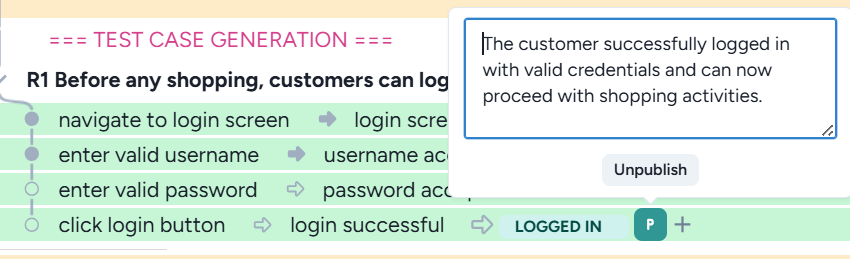
The tester can also manually publish and unpublish a state. To unpublish, click on ‘Unpublish’ above.
Publish:
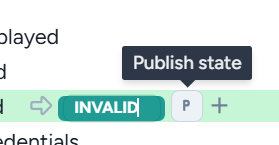
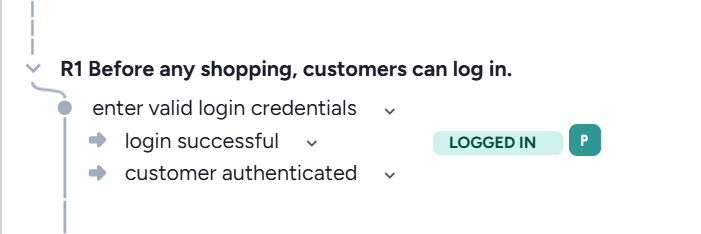
This is a very useful feature as you can easily create e2e test cases. Once a state is published, AI can use it in other features. When the AI adds a published state, Harmony considers it as a precondition, and the steps up to the state will be executed. For example, this feature uses published state ‘LOGGED IN’ above:
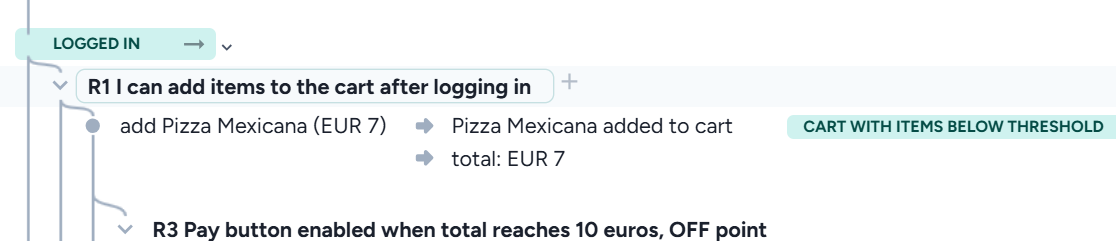
A state can occur several times and in different features; however, each published state is unique. Clicking on the right arrow next to the precondition, the published state will be displayed:
Tips for Testers & Analysts
- Keep requirements clear and concise for better AI interpretation. Unlike your company’s team, AI has no background knowledge about your planned system. Therefore, you need to add all the necessary information to fully understand the system. This may include additional requirements and explanations. Note that AI may not recognise the missing information, but will generate an incomplete test set. Extend the requirements even if a tester considers the requirements perfect.
- Add instructions to Harmony when needed. You can add any instructions right after the requirements. For example, in some cases, you don’t want domain testing, as other techniques involve the required tests. In this case, just write a sentence: Please ignore domain testing. In another case, some tests are missing. Adding an instruction to add the missing tests, Harmony usually adds the necessary test cases. Don’t extend the model for the first time, but instruct Harmony to do an even better job. Remember that regeneration is free for you.
- Request information
If Harmony generated a model without the necessary information, you can ask to do that. For example, for action state testing, you can ask the iterations how the states are created.
- Check Harmony’s feedback carefully - Harmony not only creates the model, but also gives you explanations and additional information. When you don’t know why some test cases are created, these explanations are important. You can ask for additional explanation, see the bullet point above.
- Check the fulfillment of the test selection criterion for action-state testing. AI has several biases. Sometimes it ignores the fulfillment of the test selection criterion. First, let’s check the states. Then check the model. If it’s good, then it consists of the documentation on fulfilling the criterion. This must contain the text ‘Phase A/B/C:’. If it doesn’t, then ask AI to cover the test selection criterion.
- Repeat generation when necessary. If Harmony doesn’t generate the model or it’s not good enough, repeat the generation
- Regenerate the model after any major requirement change.
- Use explanations to trace back test logic and ensure coverage.
How AI applies test design techniques
Harmony applies linear test design techniques and test selection criteria. Therefore, the number of test cases remains manageable. Even if we use only a few test design techniques, they will detect most defects.
We use the following methods:
- Domain testing
- Action-state testing
- Complementary tests
- Extreme-value tests
We argue that no other test design technique is required.
Domain testing
Domain testing is a generalization of boundary value analysis. Harmony automatically identifies when domain testing is necessary and generates domain tables to support this process. By applying domain testing, all the control flow errors will be detected.
To ensure the domain table is accurate, the specification itself must be precise. This includes clearly defining the type and precision of each parameter. By default, Harmony assumes parameters are of type decimal with a precision of 0.01. If a parameter is an integer, the specification should explicitly state this—for example: “Total price is an integer.”
Our method is highly reliable and capable of detecting all defects in the control flow. However, there are cases where the available test data may prevent the creation of a feasible test case. Consider the following requirement:
Checkout is not possible until the total price reaches 10 euros.
In this scenario, the OFF data point should be 9.99. But if the existing data set doesn’t allow for a total price of exactly 9.99, Harmony may be unable to generate a feasible test case. Does this mean Harmony produced an incorrect test? Absolutely not.
Rather than altering the test case, the correct approach is to adjust the input data to make the test executable. Otherwise, the tests may pass initially, but future changes in input data—without any modification to the code—could expose a defect. This can lead to confusion for developers who won’t understand how the bug emerged.
We strongly recommend executing the original test cases generated by Harmony. If input data needs to be modified, ensure that either:
- the code remains correct, or
- the defect is already caught by the initial test.
This approach safeguards against hidden bugs and ensures long-term reliability.
Action-State Testing
Action-state testing is an advanced test design technique that excels at uncovering computational faults. In some systems, it's sufficient to test against the stated requirements. But in others—especially those with complex workflows—additional testing is essential. That’s where state awareness comes into play.
By incorporating system states into the test steps and applying a simple yet effective selection criterion, Harmony’s AI generates additional test cases that go beyond requirement-based coverage.
You’ll see in the reasoning when action-state testing is necessary. These extra test cases are valuable and typically require no additional implementation effort. So don’t dismiss them as redundant—they’re often critical for catching subtle defects.
Want to explore how to perform action-state testing manually? We've got you covered.
Complementary Testing
There may be a happy path and an alternative action flow that doesn’t lead to a new computation function. However, this process may be flawed, so it may produce the same result as the successful path, but it must be different. AI must consider this complementary action flow, and you should check it.
Example.
R0 An employee initially has 20 free days.
R1 If an employee is late, then the number of his free days is decreased by one.
R2 If an employee takes three free days without lateness, then for the subsequent one-time lateness, the number of his free days doesn't change.
Here, the non-complementary test is:
- take 2 free days => number of free days = 18
- take one free day => number of free days = 17
- late => => number of free days = 17
And, the complementary test is :
- take 2 free days => number of free days = 18
- late => number of free days = 17
- take one free day => number of free days = 16
- take one free day => number of free days = 15
- late => => number of free days = 14
The complementary test doesn't involve any new computation function, but it must test that the action 'late' for the first time will initiate the number of free days taken from 2 to 0.
Completeness Testing
Completeness testing requires that each distinct computation function be tested. It also requires covering the alternative actions resulting in the same state. It explores alternative paths described in the requirements only implicitly, including edge cases, reversals, and indirect validations.
Completeness tests may:
- Cover the same computation function as the happy path, but in a different way
- Produce a different result computation function
Example (same computation):
Requirement.
R1. All options can be checked/unchecked by a single click and one by one.
R2 An icon appears when any option is checked.
Happy path: Click “Uncheck All” → Icon disappears
Completeness test: Uncheck options one by one → Icon disappears
Example (different computation function):
Requirement.
R1. A team has 2–5 members.
R2 A team of 4 can “lure” a member from another incomplete team.
Happy path: Team of 4 lures from team of 2–4 → Success
Completeness tests:
- Team of 2, 3, or 5 tries to lure → Not allowed, message: only team of 4, can lure
- Team of 4 tries to lure from a complete team → Not allowed, message: you cannot lure from a complete team
- and 2. lead to a different computation function (the error message), both must be tested separately
Officially, requirements should contain all alternative or negative descriptions. However, sometimes the requiremenst are not complete. AI sometimes omits some tests if the requirement also omits it. It’s much easier to complete the requirement than instruct AI to involve the necessary test.
Example.
❌If the user enters the wrong captcha code four times, the application closes, and the user cannot try again on the same day.
✅If the user enters the wrong captcha code four times, the application closes, and the user cannot try again on the same day, but the next day, they can.
Extreme Value Testing
Extreme value testing targets the minimum and maximum input boundaries that may trigger edge-case behavior.
Example:
Requirement: Mask the email address by replacing the middle part of the username and domain (excluding the TLD) with asterisks—keeping only the first and last characters visible.
To validate this, we must test with the shortest possible valid email address, such as:
This ensures the masking logic holds even at the limits of input length.